Nothing to type on AndroidRecorded by the Android app
Aranet4 HOME
Keeps the night in its own memory, so the Android app reads it in the morning. Two AA batteries last years.
About $150–$190checked October 2026; check before buying
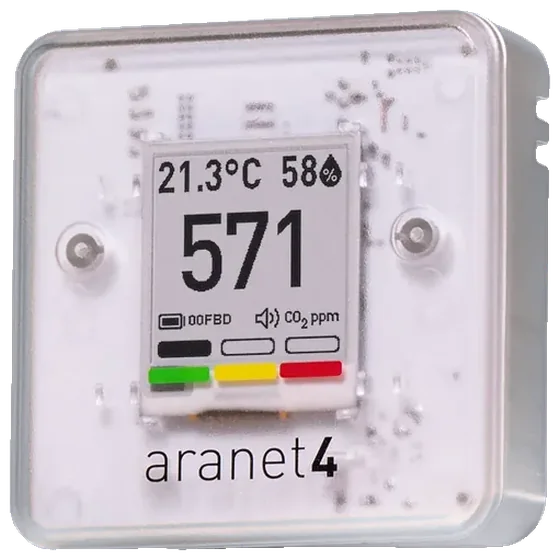
Photo: Aranet
- ±(30 ppm + 3%)CO2 accuracy, as the maker states it
- Reads its memoryWith the Android app; type it on iPhone
- Off out of the boxSelf-calibration
- BatteryTwo AA batteries that last years
At a glance
- In its favour: The Android app reads each night from its memoryOn iPhone, type the night’s high each morning, or import its CSV.
- In its favour: Two AA batteries that last years
- In its favour: Self-calibration off out of the box
- In its favour: Corrects for altitude, to about 8,000 ft
With HouseExhale
The app looks at your bedroom’s CO2 across the night and checks it against the 800 ppm goal. Here’s how this monitor’s nights get in.
With the Android app
- An Aranet4 pairs once with the Android app, which reads each night from the monitor’s memory. Your phone doesn’t need to stay in the room.
On iPhone or in a browser
- On iPhone, HouseExhale can’t read it directly. Each morning, type the night’s high from the Aranet Home app, or import its CSV.
There’s no iPhone app yet. Use HouseExhale in Safari and add it to your home screen.
Setting it up
- Install the Aranet Home app from your phone’s app store.
- Add your Aranet4 over Bluetooth.
- Let the app sync once so your history starts.
- Check that the batteries are in and the screen shows a CO2 number.
- It records every 5 minutes by default. That’s plenty for a fair overnight average.
Any Aranet4 HOME works. Its light turns yellow at 1,000 ppm by default. HouseExhale’s goal is lower: 800 on average overnight. If you’d like the light to match, set yellow to 800 and red to 1,000 in the Aranet Home app (settings wheel, CO2 indication mode, Custom).
Finding last night’s high
Open the Aranet Home app, sync, and look at last night on the CO2 history. Note the highest point while people were asleep.
Importing its export
- Open the Aranet Home app and sync your Aranet4.
- Open the CO2 history.
- Use the export or share option to save a CSV.
- Choose that CSV here.
Aranet’s manual says the app stores up to 90 days of history and exports CSV.
Where to put it: about head height, at least 2 ft from anyone’s face, away from windows, doors and vents, and in the same spot every night. More on placement
Calibrating it
- In its favour: Self-calibration off out of the boxOff by default, can be turned on
The Aranet4 ships with automatic calibration off, so it won’t drift low in a stuffy bedroom, but it won’t correct itself either. Aranet suggests a manual calibration about once a year, or sooner if the outdoor check is off. Start it in the Aranet Home app, or with the switch behind the batteries, outdoors in stable fresh air (about 420 ppm). Leave it for 30 minutes and stand at least 3 ft (1 m) away. If you’ve switched it to automatic, it needs about 8 hours of fresh air every 30 days.
Calibrated at the factory. To recalibrate, put it in fresh outdoor air (stable for 30 minutes, at least 1 m from people) and start it in the app (Settings, then CO2 calibration) or with the switch/button under the battery cover; holding the button cancels and keeps the old values. Aranet suggests once a year.
Outdoor air is about 425 ppm. Outside in the shade, a good monitor settles between about 400 and 450 within 15 to 30 minutes. Many monitors treat fresh air as 400, so 400 to 420 is normal. Can I trust my monitor?
Specs
- Model
- TDSPC0H3
- Sensor and accuracy
- True CO2 (NDIR), ±(30 ppm + 3%), corrects for air pressure (to about 8,000 ft)
- Self-calibration
- Off by default, can be turned on
- Corrects for altitude
- Yes
- Also measures
- Temperature, relative humidity and air pressure. Air pressure shows only in the app, not on the monitor’s screen.
- CO2 range
- 0–9,999 ppm
- How often it updates
- Every 1, 2, 5 or 10 minutes; 5 minutes by default. Its memory holds about 3.5 days at 1 minute, 7 days at 2, 15 days at 5 and 30 days at 10; the app keeps up to 90 days.
- Power
- Two AA batteries that last years
- Screen
- E-ink, always on
- History
- About two weeks on the monitor at its 5-minute default; up to 90 days in the Aranet Home app, which exports a CSV
- App
- Aranet Home app (free), for iPhone (iOS 11 or newer) and Android (6.0 or newer)
- Exports a CSV
- Yes
- Connects by
- Bluetooth, straight to a phone or tablet (Bluetooth 4.1 or newer); up to six devices can connect. The datasheet lists no other radio. Bluetooth can be switched off. An optional Aranet PRO base station can store up to 10 years of data.
- Alarm
- Its color indicator shows green below 1,000 ppm, yellow from 1,000 to 1,400 and red above 1,400 by default; these levels can be changed in the app. The buzzer is off out of the box; once on, it sounds once or every time CO2 goes above the red level (1,400 ppm by default).
- Smart home
- Home Assistant: official Aranet integration over Bluetooth, local (no cloud); needs firmware 1.2.0 or newer and “Smart Home integration” turned on in the Aranet Home app. Homey: built into the app and turned on by default. Apple Home: not supported; in May 2023 Aranet support called it a possible future feature. No Google Home, Alexa, IFTTT or Matter support found.
- Size
- 71 × 71 × 24 mm (2.80 × 2.80 × 0.94 in)
- Weight
- 104 g (3.7 oz), with batteries
- Works in
- 0–50 °C (32–122 °F) and 0–85% humidity; not meant for use above 4,000 m (13,000 ft). The batteries themselves are rated −20 to 50 °C (alkaline) and −40 to 60 °C (lithium).
- In the box
- The monitor, two AA alkaline batteries and a configuration pin
- Warranty
- 2 years, extended to 3 by registering the monitor and agreeing to Aranet’s email updates. Aranet also sells a 1-year extended warranty for $29.
Specs from the maker’s own pages, checked October 12 and October 17, 2026. “Not stated by the maker” means no maker page we could open says.
Turning ventilation up
Home Assistant’s Aranet integration reads its CO2 over Bluetooth on your own network, with no cloud. It needs firmware 1.2.0 or later and “Smart Home integration” turned on in the Aranet Home app. Home Assistant: Aranet integration
With a smart-home relay on a ventilator’s high-speed input, that reading can turn an HRV or ERV up at 750 ppm and back down at 650. Ventilator makers don’t document this, so check your unit’s manual first, and keep to low-voltage inputs.
Before you buy
- Worth knowing: Check the price before buyingWe couldn’t confirm a current store price, or it was out of stock, when we checked.
- Plain fact: About $150–$190 before tax and shippingAmazon listed it at $189 in October 2026, with a $151 sale from October 7. Some other US sellers list it near $250.
- In its favour: Used with the Android app on a real phone
About $150–$190, checked October 2026; check before buying. Prices change often; we checked at the maker’s store and large US retailers. Any monitor that measures true CO2 works with HouseExhale, and one is enough: move it between rooms.
Compare it
The monitors closest to it in price.
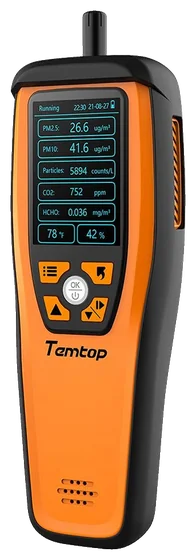
Temtop M2000 2nd
About $190–$210
Shows particles too, with a 24-hour curve on its screen. Plug it in overnight.
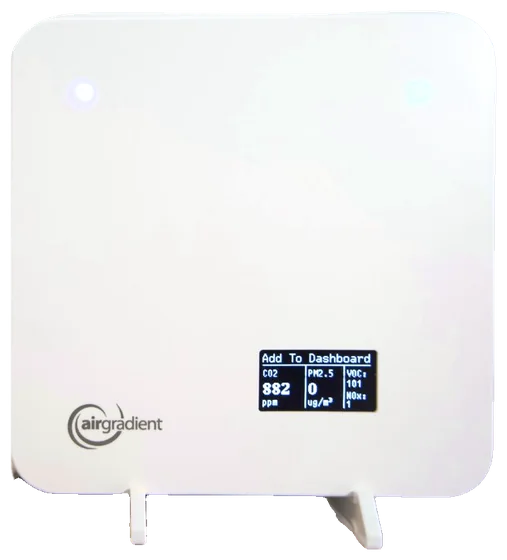
AirGradient ONE
About $230
Sends readings over Wi-Fi to a dashboard that exports a CSV, so nothing depends on your phone. Needs a plug.
Sources
- Aranet4 user guide
- Aranet: colored thresholds
- Aranet FAQ: placement and calibration
- Aranet help: calibration (automatic calibration is off by default)
- Aranet4 HOME datasheet (accuracy, pressure compensation to 750 hPa)
- Aranet help: default settings (automatic calibration off)
- Aranet help: use at high altitude
- DealNews: Amazon price, October 7, 2026
- Home Assistant: Aranet integration
- Aranet4 HOME product page
- Aranet forum: Smart Home integration setting
Have a Aranet4?
Set it up in the app tonight. It takes about 5 minutes, and the first answer comes after two or three nights.