Recorded by the Android app
Qingping Air Monitor Lite
A Qingping with a color screen that also measures particles. Its battery lasts hours, so keep it plugged in.
About $76–$90checked October 2026; check before buying
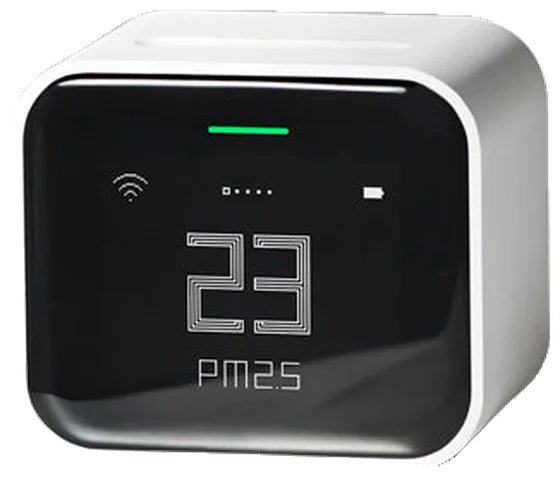
Photo: Qingping
- Not statedThe maker gives no accuracy figure
- Listens overnightWith the Android app; type it on iPhone
- Reportedly onSelf-calibration
- Plug it inNeeds a plug (battery lasts about 7 hours)
At a glance
- In its favour: The Android app records nights while your phone listensNew: tested with simulated broadcasts so farOn iPhone, type the night’s high each morning.
- Plain fact: Needs a plug (battery lasts about 7 hours)
- Worth knowing: Self-calibration reportedly on; no off switch documented
- Not stated by the maker: Altitude correction not stated
With HouseExhale
The app looks at your bedroom’s CO2 across the night and checks it against the 800 ppm goal. Here’s how this monitor’s nights get in.
With the Android app
- With the Android app, your phone listens to it overnight and saves a reading every minute. Keep the phone in the room, charging.
- New in the app: tested with simulated broadcasts, not yet with a real monitor overnight.
On iPhone or in a browser
- On iPhone, HouseExhale can’t read it directly. Each morning, type the night’s high from the Qingping+ app, or try importing its export.
There’s no iPhone app yet. Use HouseExhale in Safari and add it to your home screen.
Setting it up
- Install the app for your model: Qingping IoT for the CO2 & Temp & RH Monitor (CGP22C), or Qingping+ for the Air Monitor Lite (CGDN1).
- Add your monitor and let it show CO2.
- Keep it plugged into USB power overnight so it updates often.
- Check the screen shows a CO2 number.
- The CO2 & Temp & RH Monitor records once an hour by default. For a useful night in its own history, set a shorter recording interval in the Qingping IoT app.
Qingping’s CO2 & Temp & RH Monitor (CGP22C) and Air Monitor Lite (CGDN1) both work. Their thermometers don’t measure CO2.
Finding last night’s high
Open your monitor in the Qingping app (Qingping IoT or Qingping+) and look at last night’s CO2 history. Note the highest point while people were asleep.
Importing its export
- Look for Export or Share in the Qingping app’s history screen (Qingping IoT or Qingping+).
- Save it as a CSV and choose it here.
Qingping says the CGP22C’s history exports to a spreadsheet. We haven’t confirmed a CSV export on a real Qingping yet, so the app checks your file before saving.
Where to put it: about head height, at least 2 ft from anyone’s face, away from windows, doors and vents, and in the same spot every night. More on placement
Calibrating it
- Worth knowing: Self-calibration reportedly on; no off switch documentedOn; the maker doesn’t say whether it can be turned off (on by default, per a distributor)
Qingping doesn’t publish a calibration procedure. In the app’s settings, look for automatic calibration (a distributor of a Qingping-made monitor says it’s on by default and can be turned off) and a CO2 reset. Calibrate only outdoors, in stable fresh air, and only if the outdoor check shows it’s off.
A reviewer found a manual CO2 calibration tool in the Qingping+ app; no maker instructions found
Outdoor air is about 425 ppm. Outside in the shade, a good monitor settles between about 400 and 450 within 15 to 30 minutes. Many monitors treat fresh air as 400, so 400 to 420 is normal. Can I trust my monitor?
Specs
- Model
- CGDN1
- Sensor and accuracy
- True CO2 (NDIR, Senseair S8), plus particles; Qingping gives no accuracy figure
- Self-calibration
- On; the maker doesn’t say whether it can be turned off (on by default, per a distributor)
- Corrects for altitude
- Not stated by the maker
- Also measures
- PM2.5, PM10, temperature and humidity
- CO2 range
- Sources disagree: 400–9,999 ppm in the manual; 400–5,000 ppm on Smart Air’s (a distributor’s) page
- How often it updates
- Readings refresh every second, per a comparison site; no maker figure found
- Power
- Battery lasts about 7 hours, so keep it plugged in
- Screen
- Color screen
- History
- 30 days in the Qingping+ app, exportable in 15-minute steps (per a reviewer)
- App
- Qingping+ app (Apple App Store and Google Play), Apple’s Home app, or Mi Home / Xiaomi Home
- Exports a CSV
- Documented; not yet confirmed on a real file
- Connects by
- Wi-Fi (2.4 GHz) and Bluetooth 5.0. In Apple Home, viewing it away from home and automations need a HomePod or Apple TV as a home hub. Smart Air says it doesn’t need internet to monitor.
- Alarm
- No buzzer or warning light mentioned. Smart Air (a distributor) says the Qingping+ app sends alerts when air quality becomes unsafe.
- Smart home
- Apple Home (HomeKit) and Mi Home / Xiaomi Home, per the manual. Home Assistant: the official Qingping integration reads CO2 locally from its Bluetooth broadcasts. Matter: not supported, per a comparison site. A reviewer saw CO2 as a number in Apple Home, with only a “High” CO2 level available as an automation trigger.
- Size
- 63.6 × 46 × 54.6 mm
- Weight
- 143 g
- Works in
- Not stated by the maker
- In the box
- The monitor and a USB-C charging cable; no charger
- Warranty
- 1 year from Smart Air, a distributor; no Qingping warranty found
Specs from the maker’s own pages, checked October 12 and October 17, 2026. “Not stated by the maker” means no maker page we could open says.
Turning ventilation up
Home Assistant’s Qingping integration listens to its Bluetooth broadcasts for CO2, with no cloud. Home Assistant: Qingping integration
With a smart-home relay on a ventilator’s high-speed input, that reading can turn an HRV or ERV up at 750 ppm and back down at 650. Ventilator makers don’t document this, so check your unit’s manual first, and keep to low-voltage inputs.
Before you buy
- Worth knowing: Check the price before buyingWe couldn’t confirm a current store price, or it was out of stock, when we checked.
- Plain fact: About $76–$90 before tax and shipping
- Plain fact: New in the Android appTested with simulated broadcasts, not yet with a real monitor overnight.
About $76–$90, checked October 2026; check before buying. Prices change often; we checked at the maker’s store and large US retailers. Any monitor that measures true CO2 works with HouseExhale, and one is enough: move it between rooms.
Compare it
The monitors closest to it in price.
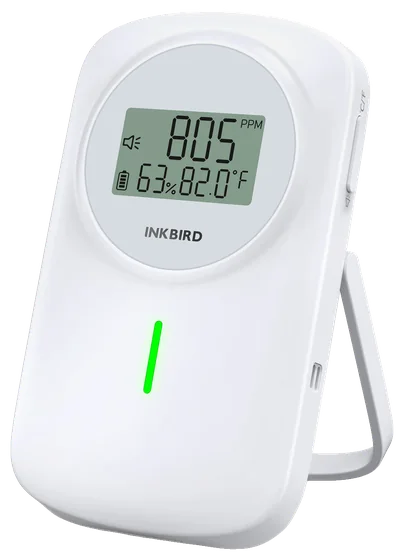
INKBIRD IAM-T2 (Bluetooth version)
About $70–$80
A rechargeable monitor that runs about 60 days on a charge. Get the Bluetooth version.
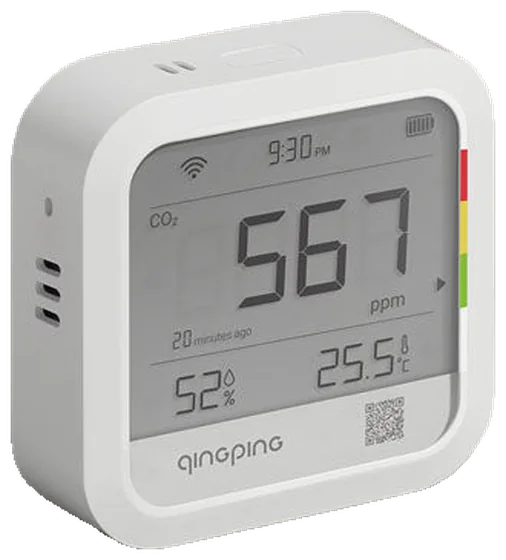
Qingping CO2 & Temp & RH Monitor
About $70
Rechargeable, with 24-hour and 30-day graphs in the Qingping IoT app. Plug it in overnight so it updates often.
Sources
- Qingping store: CO2 & Temp & RH Monitor (Qingping IoT app)
- Smart Air: auto-calibration on a Qingping-made monitor (distributor)
- qingping-ble: how its broadcast is read
- Smart Air: Qingping Air Monitor Lite spec sheet
- Smart Air UK: auto-calibration on by default (distributor)
- Home Assistant: Qingping integration
- Qingping Air Monitor Lite (CGDN1) manual (retailer-hosted)
- Smart Air Philippines: QP Lite 5in1 Air Quality Monitor
- Smart Home Compared: Qingping Air Monitor Lite
- Linkd Home: Qingping Air Monitor Lite review
Have a Qingping Lite?
Set it up in the app tonight. It takes about 5 minutes, and the first answer comes after two or three nights.