Your monitor's own app already shows you a chart. HouseExhale adds the parts a chart can't give you: a clear question, the context behind each night, a fair one-change comparison, and a before-and-after record you can keep.
What your monitor already does well
A good home monitor shows you the current reading, a history chart and a color that tells you roughly where you stand. Aranet4 monitors, for example, use green below 1,000 ppm, yellow from 1,000 to 1,400 and red above 1,400 by default. That's a reasonable daytime scale, but it's looser than the bedroom goal: 800 ppm or less, on average, while you sleep, from a 2025 review of sleep studies (why 800). A night can stay green on the Aranet and still miss the goal. If you want the light to match, set yellow to 800 and red to 1,000 in the Aranet Home app (settings wheel, CO2 indication mode, Custom). The light shows the reading right now, so it may turn yellow late in a night that still averages under 800.
That's genuinely useful. It just isn't an answer on its own.
What a chart doesn't tell you
- The question. A chart of the living room on a Sunday afternoon answers a different question from the bedroom on three ordinary weeknights. A fair check pins down which room and which nights.
- The context. Who slept in the room, and whether the door, window or fan were open or running. Without that, a high night is just a high night.
- A comparison. Was the night with the door open actually better than your usual nights, or did it just feel that way?
- A record. Before-and-after nights you can look back on, and share with an installer if you ever get that far.
Aranet4 HOME
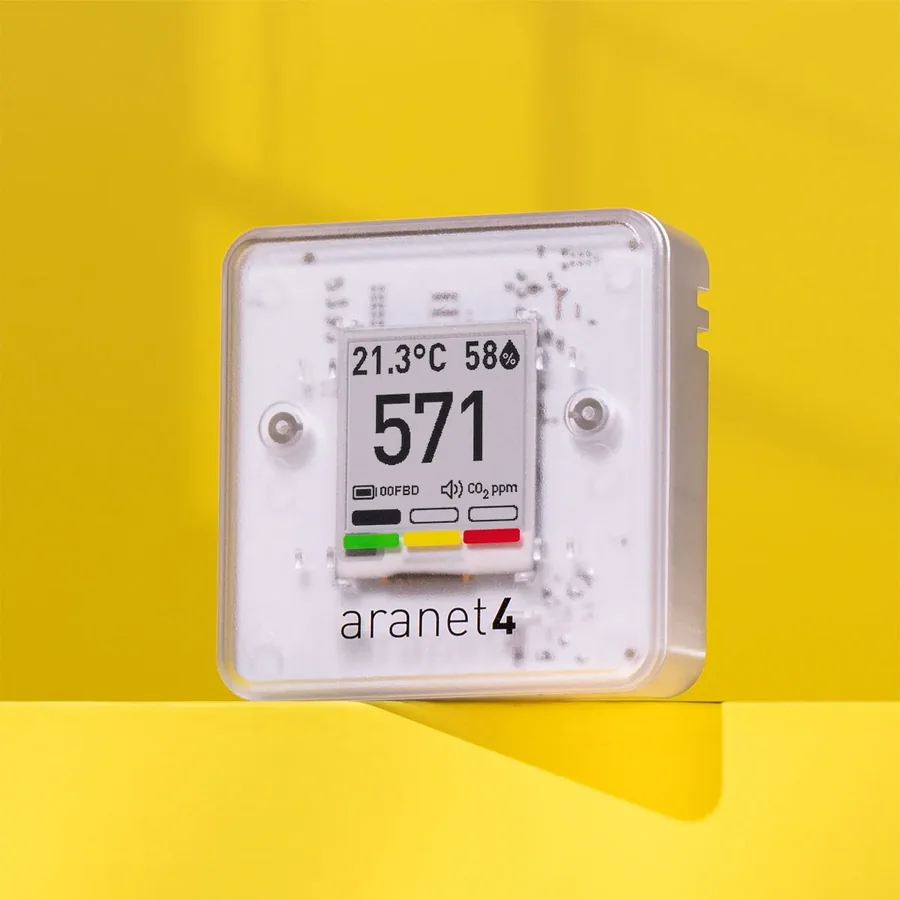 Aranet4 HOME
Pairing takes one step: enter the 6-digit code shown on the Aranet4's screen when your phone asks for it. After that, each night is read straight from the monitor's own memory, so there's nothing to type in the morning.
Because the readings are stored on the monitor, your phone doesn't need to sit in the bedroom all night. Just open the app near the monitor in the morning so it can pull in the night. Aranet's default measurement interval is 5 minutes, which is plenty for an overnight check.
SwitchBot Meter Pro CO2
The SwitchBot Meter Pro CO2 uses an NDIR sensor, so it measures CO2 directly. On Android, your phone listens for the monitor's Bluetooth broadcast through the night, which means the phone needs to stay in the bedroom. (On iPhone, type the morning high or import the SwitchBot app's CSV instead.) Keep it plugged in, with Bluetooth on.
Power makes a big difference here. SwitchBot says that on batteries the CO2 value updates every 30 minutes, and that can't be changed. With a 5V 1A adapter and a USB-C cable, it switches to updating every minute. At one reading every 30 minutes, an eight-hour night gives you only about 16 readings, and the peak can easily fall between two of them. Use USB power for any night you want to measure.
SwitchBot also lets you set updates faster than once a minute, but warns that this keeps the sensor running continuously, which may slightly warm the device and affect its accuracy. Once a minute is the setting to use.
Any other true-CO2 monitor
Other monitors work too, as long as they measure CO2 directly. Look for NDIR on the box, manual or product page. If the reading is labeled eCO2 or CO2eq, it's an estimate based on other gases and won't give a fair result.
You have two options:
- Type one number each morning. Use the highest reading your monitor shows for the night. If you can see a brief spike, for example from someone leaning over the monitor, skip it and use the highest level the room held. The high is always a little above the night's average, so a typed night errs on the strict side: if it's 800 or less, you've met the goal.
- Import a CSV export. Some monitor apps can export readings as a CSV file. Aranet's own app, for instance, can store up to 90 days of history and export it as CSV. Importing a whole night means the app can use the night's average while you slept, the same measure the sleep research uses, instead of the single peak.
Placement still matters
A great monitor in a poor spot gives poor numbers. Keep it at about head height, at least 2 ft (60 cm) from anyone's face, away from windows, doors and vents, and out of direct sun. Use the same spot every night.
The Aranet4 connects directly on iPhone and Android; SwitchBot, Qingping and INKBIRD monitors record overnight on an Android phone, and on iPhone you type the morning high or import a CSV. Whichever way your numbers arrive, three ordinary nights set up the same way will tell you far more than any single chart.
Tonight: Connect your monitor for night one
- Check that your monitor measures true CO2 by looking for NDIR on the box, manual or product page.
- Aranet4: pair once using the 6-digit code on its screen. SwitchBot: plug it into a USB-C adapter and keep your phone in the bedroom, charging, with Bluetooth on. Any other monitor: plan to note the night's highest reading in the morning.
- Place the monitor at about head height, at least 2 ft (60 cm) from anyone's face and away from windows, doors and vents.
- Before bed, note who is sleeping in the room and how the door and window are set. In the morning, check that the night was captured, or type in the night's high.
Sources
- Aranet: Aranet4 HOME / Aranet4 PRO user guide
- Aranet: Coloured thresholds (defaults and how to change them)
- Akimoto et al. (2025), ASHRAE 1837-RP: bedroom ventilation and sleep quality (the 800 ppm recommendation)
- SwitchBot: Update frequency of CO2 readings on SwitchBot Meter Pro (CO2 Monitor)
- SwitchBot: SwitchBot Meter Pro CO2 Monitor
- Sensirion: SGP30 gas sensor datasheet